







I spent time with Kako Live as a social live-streaming app, and my first impression was that it is built for people who prefer joining an active room over scrolling through polished, finished posts. The appeal is immediate: open the app, browse creators who are live, enter a room, and decide whether to watch quietly, react, or take part in the conversation. That simple loop makes it easy to understand, but the quality of the experience depends heavily on how carefully you choose rooms and how much time you want to spend interacting.
Developed by Rainbow Bridge Art, Kako Live is free to install and aimed at a Teen audience. It has passed the one-million-install mark and holds an average rating of 3.9 from around ten thousand ratings, which suggests a reasonably established audience but also a mixed experience across users. I would not treat it as a universal replacement for every social platform. Instead, I see it as a more focused option for live interaction, especially if you enjoy discovering individual creators and participating while something is happening rather than consuming content later.
How Kako Live fits into everyday live-streaming
The most useful way to approach the app is to begin with a small, repeatable routine. I would open it when I have a few spare minutes, scan the available live rooms, and avoid entering every stream at random. A quick look at the room title, creator identity, and visible activity helps me decide whether the conversation is likely to match my mood. That small pause matters because live platforms can feel noisy when you treat the entire feed as equally important.
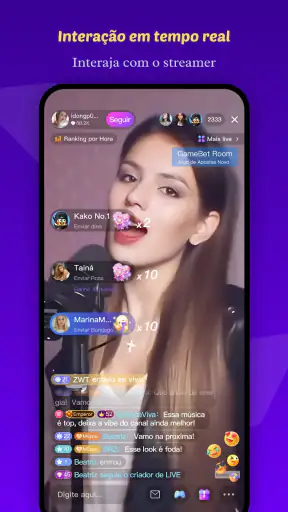
Once inside a room, I would spend a little time observing before writing anything. Live conversations move quickly, and joining with a question that was already answered can make the experience feel awkward. Watching the rhythm first also tells me whether the creator welcomes open discussion, whether the room is mostly casual chat, or whether it is centered on a particular activity. This is one of the app’s real strengths: the interaction feels more immediate than a comment section attached to an uploaded video.
For a realistic everyday example, imagine finishing work or school and wanting company without arranging a call with friends. I might browse a few rooms, stay in one where the host’s pace feels comfortable, and participate only when I have something useful or amusing to add. That turns Kako Live into a lightweight social stop rather than a commitment to produce content myself. It is also a better fit for short visits than for people who want a carefully organized library of videos.
The app’s social category is important here. It is not simply a video player with live broadcasts added on the side. The value comes from the relationship between the creator, the people watching, and the conversation taking place in the moment. If you dislike public interaction, fast-moving chat, or the possibility that a room’s tone can change while you are watching, the central experience may feel tiring rather than entertaining.
My basic viewing and participation routine
I found it helpful to separate three actions: discovering a room, deciding whether to stay, and interacting. Combining all three immediately can lead to impulsive choices, especially when a lively room creates pressure to respond. I would first check the atmosphere, then decide whether the creator’s style suits me, and only afterward use chat or other visible interaction tools. This makes the app feel calmer and helps prevent a single energetic moment from deciding where I spend my time.
For viewers, the best habit is to follow creators because of consistent quality rather than popularity alone. A crowded room can be entertaining, but it can also make individual conversation difficult. A smaller room may offer a more personal exchange, although that depends on the creator and the people present. I would try both instead of assuming that the largest audience automatically provides the best experience.
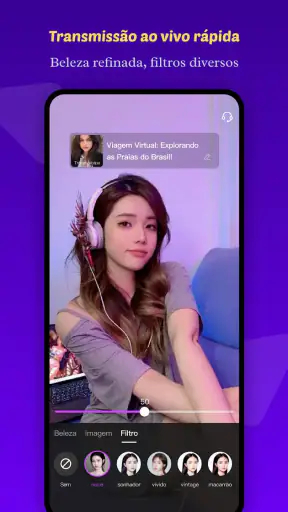
For anyone considering going live, I would begin with a clear purpose. A short session built around a topic is easier for viewers to understand than an open-ended broadcast with no direction. Even a simple plan—talking about a hobby, answering questions, or hosting a relaxed conversation—gives visitors a reason to remain. Kako Live works best when the creator treats the room as a shared space, not merely as a camera pointed at themselves.
Settings and habits worth checking before settling in
I recommend spending a few minutes reviewing the app’s available controls before becoming heavily involved. Live platforms are easier to enjoy when notifications, interaction preferences, and account choices match your schedule. If every alert pulls you back into the app, the service can start controlling your attention. I prefer allowing only the notifications that help me return to creators or conversations I genuinely care about, rather than responding to every possible prompt.
It is also worth checking how you handle public participation. I would avoid sharing personal details in a busy room, even when the host seems friendly. A live conversation can feel private because it is happening in real time, but the audience may be much wider than the few names visible at a glance. Keeping questions general and separating entertainment from personal disclosure is a sensible habit for both viewers and broadcasters.
The Teen content rating is another reason I would encourage younger users to involve a parent or trusted adult when deciding how to use the app. Live social spaces are unpredictable by nature. A creator may change topics, another participant may enter the conversation, and the tone may not remain consistent. The rating does not make the app unsuitable for every teenager, but it does make thoughtful boundaries more important than they would be with a private messaging tool.
On the technical side, I would test the app on the device and connection I normally use before committing to long sessions. Live video is more demanding than reading a feed, and a weak connection can make conversation frustrating. I would also keep the phone charged during extended viewing or broadcasting. These are ordinary precautions, but they matter more here because the app’s value depends on continuity; interruptions can break the social flow immediately.
The current version is 2.8.2, and the app supports devices running Android 6.0 or later. That gives it a broad compatibility range for Android users, although actual comfort will still depend on the phone’s age, available storage, and network performance. I would not judge the app solely by whether it installs. A device that technically meets the minimum may still feel less comfortable during busy live sessions than a newer phone.
Faster ways to find worthwhile rooms
Experienced use is less about tapping quickly and more about reducing wasted attention. I would build a small mental list of creators whose style I already understand, then use discovery for occasional surprises. This creates a balance between reliability and novelty. Returning only to familiar rooms can make the app repetitive, while browsing without any anchors can turn the experience into endless switching.
Another useful pattern is to leave politely when a room is not working for me. There is no benefit in staying simply because I already spent a few minutes there. If the pace is too loud, the topic is uncomfortable, or the chat is impossible to follow, moving on is a better use of time. Live platforms reward quick judgment because the content is temporary and the next room may suit me better.
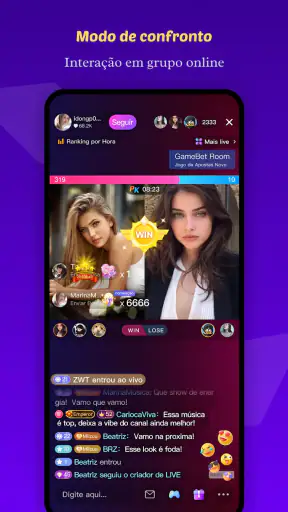
I would also avoid treating visible activity as a quality score. A room with constant messages may be exciting, but it may not offer the kind of conversation I want. A quieter stream can be more rewarding if the creator responds thoughtfully. This is a non-obvious trade-off in Kako Live: popularity can improve energy while reducing personal attention. The right choice depends on whether I want spectacle, conversation, or simply background company.
For creators, a repeatable opening routine can make a noticeable difference. I would greet newcomers, explain what the session is about, and invite a manageable type of response instead of asking the audience to say anything at all. Specific prompts are easier to answer and help prevent silence at the beginning. As the room grows, I would keep an eye on the conversation’s direction and return to the main topic when it drifts too far.
Shorter, intentional sessions may also be wiser than staying live indefinitely. A creator who ends while the room still feels engaged can leave a stronger impression than one who continues after the conversation has run out of energy. I cannot promise that this will increase an audience, but it is a healthier workflow and makes each broadcast easier to prepare for. The app rewards presence, yet presence does not have to mean being available all day.
Where the social design helps and where it creates friction
The strongest part of Kako Live is its immediacy. I can move from passive browsing into a shared moment without waiting for a video to be edited or a post to collect replies. That makes it suitable for casual companionship, creator discovery, and conversations that benefit from spontaneity. It feels more alive than a standard social feed, particularly when the host acknowledges viewers and the chat develops naturally.
That same immediacy is also the main weakness. Live rooms are inconsistent. One session may feel welcoming and well paced, while the next may be difficult to follow or simply uninteresting. The app cannot remove that unpredictability without losing the quality that makes live streaming different from recorded media. I would recommend it to people who enjoy sampling experiences, not to anyone who needs every minute of content to be polished and dependable.
Compared with a conventional social network, Kako Live places more emphasis on real-time presence and less on carefully edited profiles. Compared with a messaging app, it is more open and discoverable but less private. Compared with a video platform, it offers stronger direct interaction but less control over timing and presentation. Those differences explain why I would use it alongside other apps rather than replacing everything with it.
There is also a financial boundary to keep in mind. The app itself is free, but in-app purchases range from forty-nine cents to nearly two hundred dollars per item. I would decide in advance whether I want to spend anything and avoid making a purchase simply because a live moment creates emotional pressure. A creator’s enthusiasm can be genuine, but viewers still need a personal limit. Free access is enough to explore the basic social experience before making any decision about optional spending.
Who should use it, and who should choose another option
I think Kako Live is a good match for people who enjoy discovering creators, chatting in the moment, and moving between different social rooms. It can work well for someone who wants a casual evening activity, a window into international creator communities, or a place to practice participating in live conversation. It is especially appealing if you prefer interaction over silent scrolling and do not mind that quality varies from room to room.
I would be more cautious recommending it to users who want strict privacy, permanent access to every conversation, or a highly organized content library. A private group chat is better for close friends. A traditional video service is better when you want to pause, rewind, and choose a polished presentation. A moderated community platform may be preferable when the subject matter needs strong structure and predictable discussion rules.
Creators should also think honestly about their comfort with being visible in real time. Live broadcasting requires patience, quick responses, and the ability to handle quiet periods or unexpected comments. If you prefer editing every sentence and controlling the final presentation, recorded content will probably feel more natural. Kako Live can support spontaneous connection, but it cannot remove the pressure that comes with being present and responsive.
Limits that experienced users should understand
The app’s audience size gives it a useful sense of activity, but a large overall community does not guarantee that I will immediately find the right room. Discovery still requires judgment. I may need to try several creators before I understand where the conversations I enjoy are happening. That is normal for a live social service, but it means the first session may not represent the app at its best.
The average rating of 3.9 reflects that mixed reality. I read it as a sign to keep expectations balanced: the concept clearly works for many people, yet the experience is not uniformly smooth. Device performance, connection quality, creator behavior, and personal tolerance for live chat can all affect satisfaction. I would give the app a fair trial using several different rooms before deciding whether it belongs in my regular rotation.
I would also keep boundaries around time and spending. Live interaction is designed to encourage one more room, one more message, or one more moment of support. That can be enjoyable, but it can also make a short visit expand without notice. Setting a stopping point before opening the app is a simple way to keep the experience recreational. The same applies to purchases: explore first, decide later, and never confuse participation with an obligation to pay.
Finally, I would remember that a live room is a social environment, not a guaranteed personal service. A creator may not answer every message, and a conversation may move on before I can join. That is not necessarily a flaw, but it can disappoint users who expect direct attention. The best mindset is to participate when the room allows it and enjoy the shared atmosphere even when I am not the center of the exchange.
My final view after using the app
Kako Live succeeds when I use it as a doorway into live social moments rather than as an endless content catalogue. Its free entry, broad Android compatibility, and established audience make it easy to try, while the focus on creators and real-time conversation gives it a distinct identity. I like the fact that a casual visit can become a genuine exchange, but I also accept that some rooms will be noisy, uneven, or simply not worth staying in.
My recommendation is to start slowly: browse before participating, adjust attention and privacy habits, test several creators, and set clear limits around time and optional purchases. Those choices make the experience more comfortable and reveal the app’s real value faster than blindly following the busiest room. The best results come from treating Kako Live as a selective social habit, not an automatic stream of entertainment.
For viewers who want spontaneous interaction, it is worth trying. For users who need polished videos, private communication, or tightly controlled communities, another type of app will serve them better. After weighing both sides, I see Kako Live as a lively companion for short, intentional sessions—most rewarding when I choose rooms thoughtfully and accept the unpredictable nature of live conversation.


